


How to Automate Your Morning Routine with Smart Home Devices
There is a moment — usually around 6:47am — where everything in your morning competes for your attention at once. The alarm, the cold house, the dark kitchen, the wait for the kettle. Smart home automation does not eliminate mornings, but it makes them noticeably smoother. This guide walks you through building a morning routine that runs itself, using devices designed for Australian homes on our 240V/50Hz grid.
What you will need
- Smart globes or smart switch — for bedroom and kitchen lighting (E27, B22, or GU10 fitting depending on your fixtures)
- Smart speaker or display — Google Nest Hub, Amazon Echo, or Apple HomePod as your voice front-end
- Smart IR controller — to pre-heat or pre-cool your home through your existing air conditioner remote
- Smart plug — to automate a drip coffee maker or kettle (10A / 2400W rated for Australian outlets)
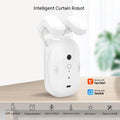
- Smart blind or curtain motor (optional) — for natural light wake-up
Budget guide: A basic setup (lights + smart plug + speaker) starts around A$150. A full setup with climate control and blinds runs A$350–A$600.
Step 1: Install your smart wake-up light
The single most impactful change you can make is replacing your bedside lamp globe with a smart colour globe. Research consistently shows that waking to gradually increasing light — mimicking sunrise — improves alertness and mood compared to a jarring alarm sound.
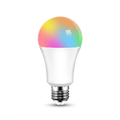
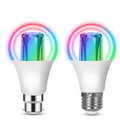
Install a smart globe (B22 bayonet or E27 screw fitting are most common in Australian bedrooms). In your app of choice (Google Home, Apple Home, or Alexa), create a routine that begins 30 minutes before your target wake time. Set the light to start at 1% brightness with a warm orange colour (2700K), gradually increasing to 100% bright white (5000K) by wake time. Name this routine Sunrise.
Pro tip: If you use your phone as an alarm, you can trigger this Sunrise routine from your alarm app. Google Clock integrates directly with Google Home routines.
Step 2: Warm up (or cool down) your home before you get up
Stepping out of bed into a cold house is one of the most reliable ways to ruin a morning. For split-system users — which covers most Australian homes — a smart IR controller plugs into a standard Australian power point and learns your existing remote's signals, giving you full app and voice control over the unit you already own. No new air conditioner required.
Schedule a climate action 20 minutes before your alarm. In summer, set cooling to 24°C. In winter, heating to 21°C. That 20-minute head start means the room is already comfortable when you wake.
Step 3: Build your Good Morning scene
A scene (also called a routine in some apps) is a single command that triggers multiple devices simultaneously. Your Good Morning scene should fire at your alarm time and do the following in one tap or voice command:
- Turn on kitchen lights at 80% warm white
- Turn on the bathroom exhaust fan via a smart switch
- Power on a smart plug connected to your drip coffee maker
- If you have smart blinds, raise them to 50%
- Start your preferred morning playlist or news briefing on your smart speaker
In Google Home: go to Automations → Add → Time of day. In Apple Home: go to Automations → Add Automation → A Time of Day Occurs. In Alexa: open Routines → + → Schedule.
Step 4: Add your departure trigger
Once you leave, your smart home should put itself into a low-power mode. Set up a secondary routine that triggers either at a fixed departure time or when the last phone leaves the home network (geofencing). This routine should turn off all lights, turn off the coffee maker smart plug, and set your climate controller to an energy-saving temperature (28°C in summer, 18°C in winter in most of Australia).
Australian considerations
Mains-powered smart plugs and switches sold for use in Australia are subject to Australian electrical safety requirements, and devices containing a radio transmitter fall under ACMA's radiocommunications arrangements — both signified by the RCM (Regulatory Compliance Mark). Be cautious with unbranded imports bought directly from overseas marketplaces, where compliance documentation is often unavailable. If it matters to you for a specific product, ask the retailer what they hold.
Australian power points are rated at 240V/10A (2400W). Most smart plugs are rated to 10A which is sufficient for coffee makers and kettles under 2400W. For higher-draw appliances like toasters or microwaves, do not use a smart plug — control them with a smart switch at the wall instead, installed by a licensed electrician.
Which ecosystem should you use?
Google Home is the most flexible for routines and works with the broadest range of AU-available devices. Apple Home offers the best privacy (all automation runs locally on your Apple devices) and integrates seamlessly if you are already in the Apple ecosystem. Amazon Alexa has excellent routine depth and works well if you prefer Echo speakers. Matter is the new universal standard — devices certified for Matter work across all three platforms, which future-proofs your investment.
Most PureNode devices are set up once in the free Tuya / Smart Life app, then linked to Google Home, Alexa or Apple Home from there — so you can use whichever assistant you already have.
Frequently Asked Questions
Do smart home devices work on Australian 240V power?
Devices sold for the Australian market are built for our 240V/50Hz grid and AU plug format. Be careful with grey imports from overseas marketplaces, which may ship with the wrong plug or lack Australian compliance documentation.
Can I automate my morning without a smart speaker?
Yes. A smartphone with the Google Home, Apple Home, or Alexa app is sufficient. Time-based automations run in the cloud and do not require a speaker to be active.
What is the cheapest way to start?
A single smart globe in your bedside lamp and a free ecosystem app. Create a sunrise routine 30 minutes before your alarm — highest impact, lowest cost.
Will automations work without internet?
Apple Home runs locally without internet. Google Home and Alexa are more cloud-dependent. Matter-certified devices prioritise local operation.
Can I use a smart plug with my kettle?
Yes, for kettles under 2400W. Check the label — most Australian kettles are 1800–2400W, within a standard smart plug's 10A/2400W limit.
Ready to build your morning routine?
Browse PureNode's range of smart lighting, climate controllers, and curtain and blind motors. Every product page tells you upfront whether the device needs a hub, and which ecosystems it works with.
Products in this guide
The devices mentioned above, in stock and shipped free Australia-wide.
Not sure where to start?
Browse our under-A$100 picks — the essentials most people start their smart home with.