


Circadian Rhythm Lighting: How to Wake Up Naturally with Smart Lights
The light in your home is affecting your sleep whether you notice it or not. Blue-rich white light (cool white, above 5000K) suppresses melatonin production and signals “daytime” to your brain. Warm orange light (below 3000K) allows melatonin to rise and prepares your body for sleep. For most of human history, this happened automatically with the sun. Smart lights let you recreate this cycle indoors, on a schedule that matches your actual day.
What you will need
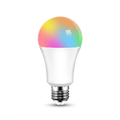
- Colour-tunable smart globes — look for “tuneable white”, “RGBCW” or “WW to CW” (warm white to cool white). A globe that only does one fixed colour temperature cannot do this.
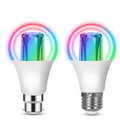
- The right fitting — B22 (bayonet) is the most common fitting in Australian lamps and pendants, E27 (Edison screw) is also widespread, and GU10 is standard for downlights. Check your existing globe before ordering.
- Wi-Fi, or a hub — Wi-Fi globes need no hub. ZigBee globes need a ZigBee hub.
- The free Smart Life app — where the globe is set up, before linking to Google Home, Alexa or Apple Home.
Understanding colour temperature
Colour temperature is measured in Kelvin (K). The lower the number, the warmer (more orange) the light:
- 2200–2700K: Warm white — mimics candlelight/sunset. Use in evenings and bedrooms.
- 3000–3500K: Neutral warm — good for bathrooms and dining rooms.
- 4000–4500K: Neutral cool — kitchens, offices, work areas during the day.
- 5000–6500K: Cool daylight — boosts alertness. Use in mornings and workspaces.
Step 1: Install your tunable smart globes
Replace globes in the rooms you spend the most time in: bedroom, living room, home office, and kitchen. Smart globes are direct replacements for your existing globes — no rewiring and no electrician. Turn off the wall switch, unscrew the old globe, screw in the smart globe, restore power, and pair it in the app.
Important for Australian homes: use globes sold for the Australian market so they are built for our 240V supply. Avoid installing smart globes in fully enclosed fixtures where heat cannot escape — it shortens their life considerably.
Step 2: Set up your circadian schedule
Create the following timed automations. The times below are a starting point — adjust to your actual schedule:
- 6:00am — Sunrise simulation: Bedroom globe: 1% brightness, 2200K. Gradually increase to 100%, 5500K by 7:00am.
- 7:00am — Morning boost: Kitchen and living room: 100% brightness, 5000K. This signals your brain it is daytime.
- 12:00pm — Midday sustain: All active rooms maintain 80–100%, 4500–5000K through the afternoon.
- 5:00pm — Evening wind-down begins: Start reducing colour temperature to 3500K at 80% brightness.
- 7:00pm — Warm evening: Living room and dining: 60% brightness, 2700K. Bedroom off or nightlight only.
- 9:00pm — Pre-sleep: All lights to 30% brightness, 2200K. Avoid any blue-white light from this point.
- 10:00pm — Goodnight: All lights off, or bedroom only at 5% warm nightlight.
Step 3: Set up automation in your ecosystem
You can build the whole schedule in the Smart Life app under Scene → Automation, creating one automation per time point and setting brightness and colour temperature for each.
If you prefer to run it from your assistant: in Google Home, go to Automations → Add → Time of day. In Apple Home, create a scene per time point, then trigger each with Automations → A Time of Day Occurs. In Alexa, create a routine at each time point.
Whichever you choose, set it once and leave it — the point of circadian lighting is that you stop thinking about it.
Step 4: Handle visitors and manual overrides
Your wall switches still work normally. But if you turn a smart globe off at the physical switch, it loses power and its network connection, so it cannot be controlled remotely until the switch is back on. The simplest fix in a rented or shared home is to agree that the switch stays on and control happens by voice or app. A dedicated smart switch is the tidier long-term answer, though that is wiring work for a licensed electrician.
The science behind it — why it works
The suprachiasmatic nucleus in your hypothalamus acts as your body's master clock. It synchronises to light entering your eyes through dedicated photoreceptor cells called intrinsically photosensitive retinal ganglion cells. These cells are most sensitive to short-wavelength (blue) light around 480nm — abundant in daylight and in cool-white LEDs. By controlling the colour temperature of your lights, you are directly signalling that clock. Light exposure is widely recognised in sleep research as one of the most effective non-pharmacological levers for improving sleep quality.
Frequently Asked Questions
What colour temperature is best for sleep?
2200–2700K (warm orange-white) at under 30% brightness for the 2 hours before bed. Avoid anything above 3500K in the evening.
Do I need to replace all globes?
Start with just the bedroom and living room. Even two tunable globes on a schedule make a noticeable difference. Expand over time.
Do I need an electrician?
No — a smart globe screws in exactly like a normal one. Only wall-wired smart switches need a licensed electrician.
Tuneable white vs RGB — which is better?
For circadian lighting, tuneable white is what matters. RGBCW globes include dedicated warm and cool white LEDs alongside colour, so they do both jobs.
Which globe fitting is most common in Australia?
B22 (bayonet) for most lamps and pendants. GU10 for downlights. E27 for some pendants. Check before buying.
Start your better-sleep setup
Browse PureNode's smart lighting — including RGBCW globes that tune from warm 2700K through to cool daylight, plus LED strips and light bars for ambient evening lighting. Each product page lists the fitting and whether a hub is needed.
Products in this guide
The devices mentioned above, in stock and shipped free Australia-wide.
Not sure where to start?
Browse our under-A$100 picks — the essentials most people start their smart home with.