


How to Get Instant Phone Alerts When Someone Enters Your Home
A door contact sensor sticks to any door or window frame with adhesive, takes about two minutes to fit, and sends a notification to your phone within seconds of the door opening. Combined with a smart home ecosystem, that simple trigger can set off a chain of actions — lights turn on, a siren sounds, a speaker announces the event. This guide shows you how to set it all up, start to finish.
What you will need
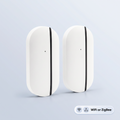
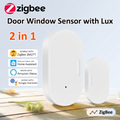
- A door or window sensor — a two-piece magnetic contact sensor. Our door and window sensors come in Wi-Fi and ZigBee models
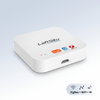
- A ZigBee hub — only if you choose ZigBee sensors. Wi-Fi models need no hub
- The free Smart Life app — where the sensor is set up
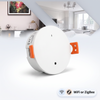
- Optional: a motion or presence sensor — to detect movement inside rooms rather than only at entry points
No drilling, no wiring, and no electrician. These are battery-powered devices that mount with adhesive.
Wi-Fi or ZigBee — which sensor should you buy?
This is the decision that trips people up, so get it right before you order.
- Wi-Fi sensors connect straight to your router. No hub to buy, simplest possible setup. Best if you are fitting one or two sensors.
- ZigBee sensors use a low-power radio and need a ZigBee hub to reach your network. The hub is a one-off purchase that covers dozens of devices. Batteries last far longer, and each sensor strengthens the mesh for the others. Best if you are fitting four or more.
The rule of thumb: fewer than three sensors, choose Wi-Fi. More than three, buy one hub and go ZigBee — it works out cheaper per device and puts far less load on your Wi-Fi.
Every product page on our store states plainly whether that model needs a hub.
Step 1: Install the sensors
Contact sensors come in two pieces: a main unit containing the electronics and battery, and a plain magnet. The main unit attaches to the door or window frame; the magnet attaches to the moving part. When the door opens, the magnet moves away and the sensor triggers.
Clean both mounting surfaces with isopropyl alcohol or methylated spirits and let them dry — adhesive fails on dusty or oily surfaces more often than for any other reason. Peel the backing, press firmly for 30 seconds, and leave it an hour before testing.
Placement: mount the two pieces so they sit within 5mm of each other when the door is closed. Align the small marks on the sides of each piece. On a sliding window, mount both on the top track where they are out of the way.
Step 2: Pair the sensor in the Smart Life app
Download the free Smart Life app (iOS or Android), create an account, then:
- Pull the battery tab, or press and hold the pairing button until the LED flashes rapidly
- In Smart Life, tap + → Add Device. The app should detect the sensor automatically
- For Wi-Fi sensors, enter your Wi-Fi password. It must be your 2.4GHz network — these devices do not connect to 5GHz
- For ZigBee sensors, put your hub into pairing mode first, then add the sensor through the hub
- Name it something you would actually say out loud — “Front door”, not “Sensor 1” — and assign it to a room
If pairing fails, it is almost always the 2.4GHz issue. Many Australian routers broadcast 2.4GHz and 5GHz under a single network name. Temporarily split them in your router settings, pair the device, then merge them back if you prefer.
Step 3: Turn on notifications
In Smart Life, open the device, tap the settings icon, and enable notifications. Then check your phone's own settings — notifications must be allowed for Smart Life at the operating system level, or nothing will come through no matter what the app says.
Test it: open the door and confirm the alert arrives. Do this before you rely on it.
Step 4: Link to Google Home, Alexa or Apple Home
Pairing happens in Smart Life, but day-to-day control can live in whichever assistant you already use. In the Google Home, Alexa or Apple Home app, add the Smart Life service and sign in once. Your sensors appear automatically.
Now you can ask “Hey Google, is the front door open?”, and use the sensor as a trigger in that assistant's routines.
Step 5: Build automations worth having
A notification is useful. An automation is better. Some that people actually keep switched on:
- Hall light at night — front door opens between sunset and sunrise, hall light turns on at 40%
- Left-open reminder — if the back door stays open more than five minutes, send a reminder. Excellent for pets and air conditioning bills
- Spoken announcement — have a smart speaker say “Front door opened” when you are home. Useful with kids
- Away alert — when everyone has left, any door opening triggers a phone alert and turns lights on
- Medicine or liquor cabinet — a sensor on a cupboard door with alerts on, for households with young children
Build these in Smart Life under Scene → Automation, or in your assistant's routines section.
Battery life and maintenance
Most contact sensors run on a CR2032 coin cell. Wi-Fi models typically last several months to a year; ZigBee models often 12–18 months or more, because they wake only briefly to transmit. Smart Life reports battery level per device — check it occasionally, and replace the cell before it dies rather than after.
If a sensor stops reporting, the usual causes are a flat battery, adhesive letting go in summer heat, or the two pieces drifting out of alignment as the door settles.
Frequently Asked Questions
Do I need a hub for a door sensor?
Only for ZigBee models. Wi-Fi sensors connect straight to your router. ZigBee sensors need a hub — one purchase covering dozens of devices. Every product page says which type it is.
Do I need an electrician?
No. These are battery powered and mount with adhesive — no wiring, no drilling, no electrical work.
Why won't my sensor connect to Wi-Fi?
Almost always because it's being offered 5GHz. Smart home devices use 2.4GHz only. Split the bands temporarily in your router, pair, then merge them back.
How long do batteries last?
Wi-Fi models: several months to a year on a CR2032. ZigBee models: often 12–18 months or more.
Do alerts work if my internet drops?
Phone notifications need a connection, so they'll pause during an outage and resume when it returns. Hub-based local automations may keep running.
Get started
Browse PureNode's door, window and motion sensors and ZigBee hubs. Every product page tells you whether the device needs a hub, which assistants it works with, and how long the battery lasts.
Products in this guide
The devices mentioned above, in stock and shipped free Australia-wide.
Not sure where to start?
Browse our under-A$100 picks — the essentials most people start their smart home with.