


Curtain and Blind Motors That Work with Alexa in Australia (2026 Buying Guide)
Motorised curtains are one of the few smart home upgrades that people notice every single day — curtains that open with the sunrise, close at dusk, and respond to a voice command from the couch. The hard part is not the smart home side. It is buying a motor that physically fits the window treatment you already have. Get that wrong and no amount of app configuration will save it.
What you will need
- A motor matched to your window treatment (see Step 1 — this is the step people get wrong most often)
- 2.4GHz Wi-Fi, or the gateway included with the motor
- The free Smart Life app, plus the Alexa or Google Home app
- A tape measure — motors have maximum supported rail length and curtain weight limits
Step 1: Match the motor to your rail or blind type
This is where most returns happen. There is no universal “curtain motor” — the hardware differs by window treatment:
- Curtain track or rail systems (fabric curtains on a straight or bent rail): need a track motor that drives the existing carrier mechanism, or a clip-on robot that grips the rod and pulls itself along. Check maximum rail length and curtain weight — heavy blockout fabric needs more torque than sheers.
- Roller blinds: need a tubular motor that fits inside the existing tube. Measure the tube's internal diameter first — 25mm, 32mm and 38mm are the common sizes and they are not interchangeable.
- Venetian or vertical blinds: need a tilt motor, which controls slat angle rather than open/close travel. Different mechanism again.
Buying the wrong category is the single biggest cause of “it doesn't work with Alexa” complaints — the motor was never going to work, because it was the wrong physical fit rather than a smart home problem.
Renting? Start with a clip-on curtain robot
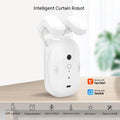
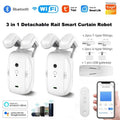
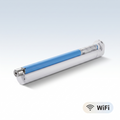
If you cannot modify the fittings, a curtain robot clips onto the rod you already have and pulls the curtain along it. No tools, no track replacement, no holes — and it comes with you when you move. It is the only genuinely renter-friendly option in this category.
Note that double curtains need one robot per side, since each one drives a single curtain.
Step 2: Install the physical motor
Clip-on robots take about a minute — open the clamp, fit it to the rod, close it.
Track motors typically attach to the existing track without removing it from the wall, though this varies by model. Roller blind motors require removing the existing tube's spring mechanism and fitting the motorised tube, which is a two-person job for anything wider than about 1.5 metres.
None of these involve mains wiring — they run on rechargeable batteries or a low-voltage plug pack — so no electrician is required. If the window is above head height or needs ladder work, a handyman is worth the money.
Step 3: Pair the motor in Smart Life
Download the free Smart Life app, then put the motor into pairing mode — usually a long press on a button on the motor housing, or on its included remote. In the app, tap + → Add Device.
If the motor connects over Wi-Fi, you will need your 2.4GHz network — these devices do not use 5GHz. If it came with a gateway, pair the gateway first, then add the motor through it.
Test open and close from the Smart Life app before going anywhere near Alexa. If it does not work here, it will not work there either.
Step 4: Link to Alexa or Google Home
In the Alexa app, go to More → Skills & Games, search for Smart Life, enable the skill and sign in with your Smart Life account. Return to Devices and tap Discover devices — your motor should appear within a minute as a “Cover” device type.
Assign it to the correct room so “Alexa, open the lounge room curtains” resolves properly. The same process works in Google Home under + → Set up device → Works with Google.
Step 5: Calibrate travel limits
Almost every curtain and blind motor needs a calibration step to learn where “fully open” and “fully closed” are. Skip it and you get grinding noises, or a curtain that stops halfway.
Do this in the Smart Life app, not Alexa — usually under the device settings as Calibrate or Set limits. Run the curtain fully open and set that limit, then fully closed and set that one. Test with a voice command afterwards to confirm the positions match.
What to look for when shortlisting a motor
- Maximum rail length and weight rating — check against your actual curtains, especially blockout or lined fabrics
- Tube diameter for roller blinds — measure before ordering, not after
- Battery or plug pack — rechargeable models install anywhere but need charging every few months; plug-pack models are set-and-forget but need a power point near the window
- Noise — matters more than people expect for a bedroom. Slower motors are generally quieter
- Whether a gateway is included — some motors bundle one, some assume you already have Wi-Fi coverage at the window
Frequently Asked Questions
Can I motorise curtains if I'm renting?
Yes — a clip-on curtain robot attaches to your existing rod. No tools, no holes, and it moves house with you.
Do I need an electrician?
No. These run on rechargeable batteries or a low-voltage plug pack — the work is mechanical, not electrical.
Do they work with heavy blockout curtains?
Often, but check the motor's weight and rail length rating against your curtains first. Blockout fabric needs more torque than sheers.
Why won't my motor stop in the right place?
It hasn't been calibrated. Use the Smart Life app (not Alexa) to run "set limits", moving the curtain fully open then fully closed.
How long does a battery motor last?
Typically several months of normal daily use, recharged over USB. Heavier curtains shorten it.
Still deciding on a protocol?
If you are weighing up Wi-Fi against ZigBee for the rest of your home, start with our ZigBee vs Matter vs Wi-Fi guide.
Browse PureNode's curtain and blind motors — clip-on robots for renters, retrofit track motors, and tubular roller blind motors. Each product page lists the fitting it suits, the weight it handles, and which assistants it works with.
Products in this guide
The devices mentioned above, in stock and shipped free Australia-wide.
Not sure where to start?
Browse our under-A$100 picks — the essentials most people start their smart home with.