
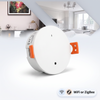


Control Your Split System AC with Your Phone Using a Smart IR Controller
If your air conditioner came with a remote control, a smart IR controller can make it work with your phone, Google Home, and Alexa — without touching a single wire, and without an electrician. IR (infrared) controllers work by learning and replicating the signals from your existing remote. From your phone's perspective, it looks like you pressed a button on the remote; your air conditioner never knows the difference.
What is a smart IR controller?
A smart IR controller is a small Wi-Fi-connected device that plugs into a standard Australian power point and emits infrared signals — the same invisible light beam your AC remote uses. You aim it at your AC's indoor unit, teach it your remote's signals, and from that point on your phone or voice assistant can send those signals on your behalf.
There are two useful shapes this comes in:
- A dedicated aircon controller — set up specifically for air conditioners, with temperature, mode, fan speed and swing control presented the way the remote does. Simplest choice if AC is all you want to automate.
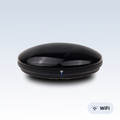
- A universal IR blaster — controls your AC plus any other infrared device in the room: TVs, fans, projectors, set-top boxes. One puck replaces the pile of remotes on the coffee table.
Both plug into a normal power point over USB, both are controlled through the free Smart Life app, and both link to Google Home and Alexa.
Does this work with ducted air conditioning?
Usually not, and it is worth knowing before you buy. Ducted systems are typically controlled by a wired wall controller rather than an infrared remote, and an IR controller has nothing to talk to. The same applies to some commercial systems and any AC using an RF remote.
The test is simple: if you point your remote at the unit and it only works when aimed at it, that is infrared and an IR controller will work. If your remote works from anywhere in the room, or the control is a panel screwed to the wall, it is not infrared.
Step 1: Position and plug in the controller
The IR controller must have a clear line of sight to your split system indoor unit's IR receiver — typically behind the front panel grille, at the right-hand end of the unit. Place or mount the controller where it can “see” the indoor unit without obstruction.
A spot on a bookshelf or TV unit within 6–8 metres of the indoor unit is ideal. IR range is typically 10–15 metres in open space, but it will not go through walls or around corners — infrared needs line of sight.
Step 2: Connect to Wi-Fi
Plug in the controller, download the free Smart Life app, and follow the setup process. You will need your 2.4GHz Wi-Fi password — IR controllers do not connect to 5GHz networks.
If your router broadcasts a single network name that covers both bands (common on Australian NBN routers), you may need to temporarily split them during setup. This is the single most common reason setup fails.
Step 3: Learn your AC remote
In the app, add your air conditioner brand. There is a built-in database covering thousands of AC remotes — select your brand (Daikin, Mitsubishi Electric, Fujitsu, Panasonic, Samsung, LG, Carrier and so on) and your model. The app confirms by testing: it sends a command and asks whether your AC responded.
If your remote is not in the database, use manual learning. Hold the original remote near the controller and press each button in turn — the controller memorises each signal. This works for any brand, including older units.
Step 4: Connect to Google Home, Alexa or Apple Home
Once the controller is working in Smart Life, link Smart Life to your assistant — a one-time connection. In Google Home: + → Set up device → Works with Google → Smart Life. In Alexa: Devices → + → Add Device, then enable the Smart Life skill.
After that, “Hey Google, set the lounge aircon to 22” works directly.
Step 5: Set up smart schedules
Now that your phone controls the AC, set up schedules:
- Morning pre-cool or pre-heat: turn the AC on 20 minutes before your alarm at your target wake temperature
- Away setback: when everyone leaves, switch to economy mode (28°C cooling or 16°C heating)
- Arrival comfort: return to comfort temperature 20 minutes before your usual arrival time
- Night off: turn the AC off at 10:30pm, or later in extreme heat
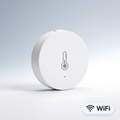
Pair the controller with a temperature and humidity sensor and you can go further — start cooling automatically when the room passes 27°C, rather than at a fixed time.
Does a smart IR controller void my AC warranty?
No. An IR controller does not connect to, modify, or physically touch your air conditioner in any way. It simply replicates remote control signals from a separate device sitting across the room. Your AC warranty is unaffected.
Frequently Asked Questions
Will it work with any split system?
Any split system with a standard IR remote — which covers virtually all consumer brands sold in Australia. Not compatible with RF remotes or wired wall controllers.
Will it work with ducted air conditioning?
Usually not — ducted systems normally use a wired wall panel, not an infrared remote. If your remote only works when pointed at the unit, it's infrared and you're fine.
Do I need an electrician?
No. It's a USB-powered device that sits on a shelf. No wiring, no contact with the air conditioner.
My AC brand isn't in the app — what now?
Use manual learning: point your original remote at the controller and press each button. It memorises every signal regardless of brand.
Will it reduce my electricity bill?
It can — mostly by stopping the AC running in an empty house. How much depends on your system, tariff and current habits.
Ready to make your AC smart?
Browse PureNode's smart climate control — aircon controllers and universal IR blasters that work with your existing remote, plus temperature sensors to trigger them automatically. Every product page states which assistants it works with and whether a hub is needed.
Products in this guide
The devices mentioned above, in stock and shipped free Australia-wide.
Not sure where to start?
Browse our under-A$100 picks — the essentials most people start their smart home with.